[EDIT: This post was originally written in January 2023 and lightly edited in 2025]
Jeremy Bailenson
As much as I admire Jeremy Bailenson’s research work (really!) his Communication 166/266 Virtual People course in June 2021 had some real problems. In its defense, it was a first-of-its-kind course, even if it wasn’t the very first course in VR. Depending on how to define VR versus XR, groups of this size, 263, have met synchronously in other platforms.
Boast Much?
Bailenson defends: “To the best of my knowledge, nobody has networked hundreds of students
(with) VR headsets for months at a time in the history of virtual
reality, or even in the history of teaching.”
The scale of this course is what sets it apart compared to other “in-VR” courses. In addition to having a relatively large number of students enrolled in the course, we also had a large number of sessions taking place in VR over time, many of which were in a networked virtual environment. To our knowledge, prior courses that have used VR in an educational setting have rarely accomplished all three of these criteria.
Here is a YouTube video, Stanford “Virtual People” class in the Metaverse posted by Bailenson.
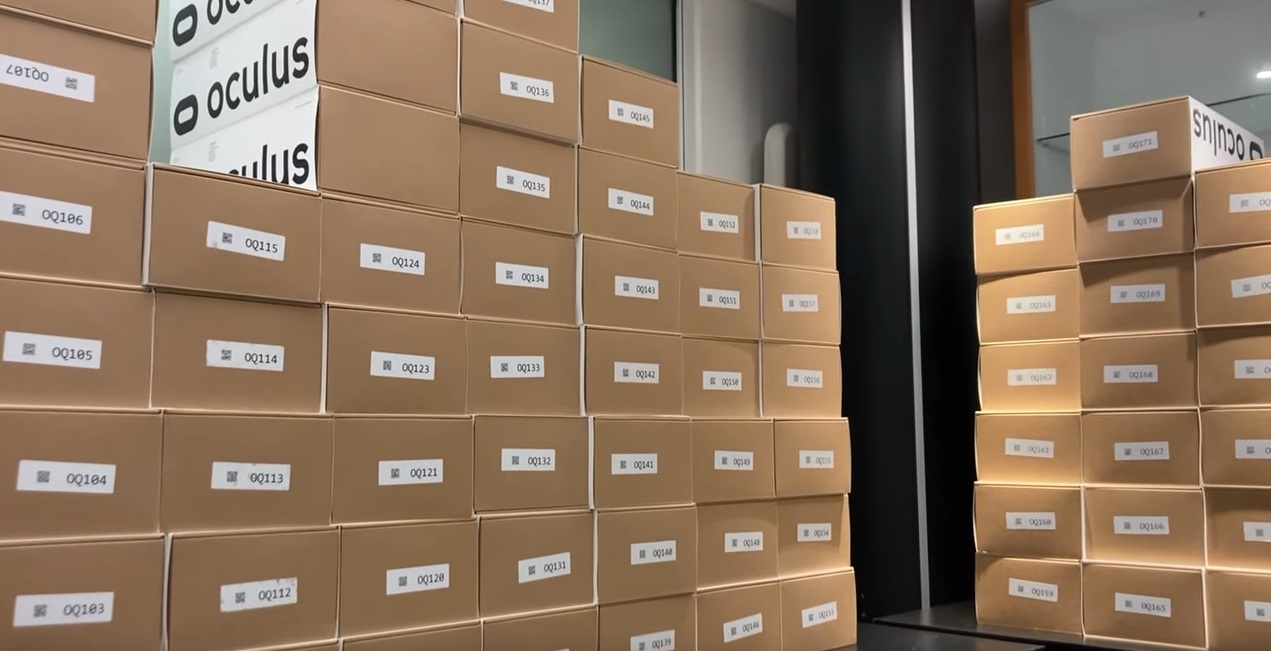
In addition to the headsets, the course also needed software to connect
the students and teachers. For this, Bailenson said the university
decided to use the ENGAGE virtual communication system. ENGAGE is used by major companies and educational organizations to hold virtual meetings and events.
A Big Problem
I looked at some of the film clips closely. I searched and the early clips appear to be deleted off of YouTube. I have facilitated small and large events in XR.
In the video clips of this course, I can detect that sound appeared to be a somewhat major problem in the platform; getting users to hear, signal that they could hear, or having multiple groups in one space (like a lab) and hear over top of each other.
The Headsets
Learners in the course received the Quest 2 headsets.
“Virtual Reality is becoming mainstream, with more than ten million
systems being used in the United States alone. This class examines VR
from the viewpoint of various disciplines, including popular culture,
engineering, behavioral science, and communication. Each student will receive an Oculus Quest 2 headset, and the bulk of our learning will
occur while immersed in VR.”
The Facebook login requirement had sparked complaints and privacy
worries, leading some organizations to seek a workaround. Stanford
University uses Meta’s headsets in its courses on VR, said Jeremy
Bailenson, the founding director of the institution’s Virtual Human
Interaction Lab. To ensure student privacy, the lab had to seek Meta’s help in creating anonymized accounts for classroom use.
While the experience was good in that, at the beginning of trying out any new technology, there will be false starts. Said another way, it is good to learn that bringing in 30 learners to one large-ish lab space to teach separate labs of 5 people each won’t work if there is flat sound. That has be learned. I think his course showed that.
But overall, conducting a course with donated technology and then turning around and saying the learning was great* is a conflict of interest.
I found a written summary here, but it’s light on conclusions. There a few glimmers, but otherwise, they did seem to hint that the groups versus sound problems that appeared in the video did happen.
* What does “the learning was great” actually mean? Bailenson and Han claimed better presence, enjoyment, motivation, and transfer. While I could let you consider if any of those deserve merit, I railed against the conclusions of the course in my The Immersion Delusion post. This post, being written more than 2 years before I hit publish, focuses on the hype just as the course was starting. Therefore, obviously, this particular post does not hit hard on hype versus results. It only focuses on hype and the conflict of interest of hitting the airwaves with how amazing your course must be, to be a first of its kind, learning about VR in VR, yada yada yada.
[EDIT: I decided to publish this post on 12/26/2025. I’ve done quite a deeper dive on that course and the publications around it. I feel even more confident and I edited this article to come right out and say that Bailenson had a conflict of interest, rather than a “dis-authentic event in research” around the entire course and following publications.]
Happy Twelvetide or the name you might recognize, The 12 Days of Christmas! For
you, I’ve arranged 12 of my most favorite XR-for-education examples.
These are virtual sites, simulations, companies, or concepts. But what’s a good story without some twists? – Some of these no longer exist. Let that twist your noodle. 😕 – Some are concepts. – These were originally posted to LinkedIn as separate posts. This blog posts represents all 12 in one place (so buckle up, this will be long).
Day 1 Heritage Key
Happy Twelvetide! Number 1 on my 12 favorite
XR-for-education list is Heritage Key by Rezzable. It was in Second Life
and then Open Sim ~2008-2010, but no longer exists. Visitors could
visit recreations of Stonehenge or the Valley of the Kings. My fav parts? –
Users **participated** in the building of Stonehenge. (THINK: NPCs
giving instructions to quests in games.) Did you know that there were
different versions of Stonehenge over thousands of years, including a
wooden one? –
Time travel – The Stonehenge location (if I’m remembering it correctly)
had “time travel” for visitors to go to Stonehenge in different times
by directing users BACK to an underground Visitors Center where
(unbeknownst to the visitors) the overhead scene would change and go
forward ~500 years or something. Nice time travel technique! –
Avatar clothing. Each location offered avatars garb to wear appropriate
to the builds (all of them, at once). I remember the choices where:
Druid-theme, Thebes-theme, or Indiana Jones-theme. All a super fun way
for users to keep playing along with “we are participating with” these
locations. THINK: DRESS FOR THE JOB YOU WANT. Will
someone resurrect this concept fully, please? It was so cool despite
being from more than 10 years ago. And it outperforms a lot of XR for
education even today.
YouTube video from Heritage Key: https://www.youtube.com/watch?v=_SqTwaa0HVg
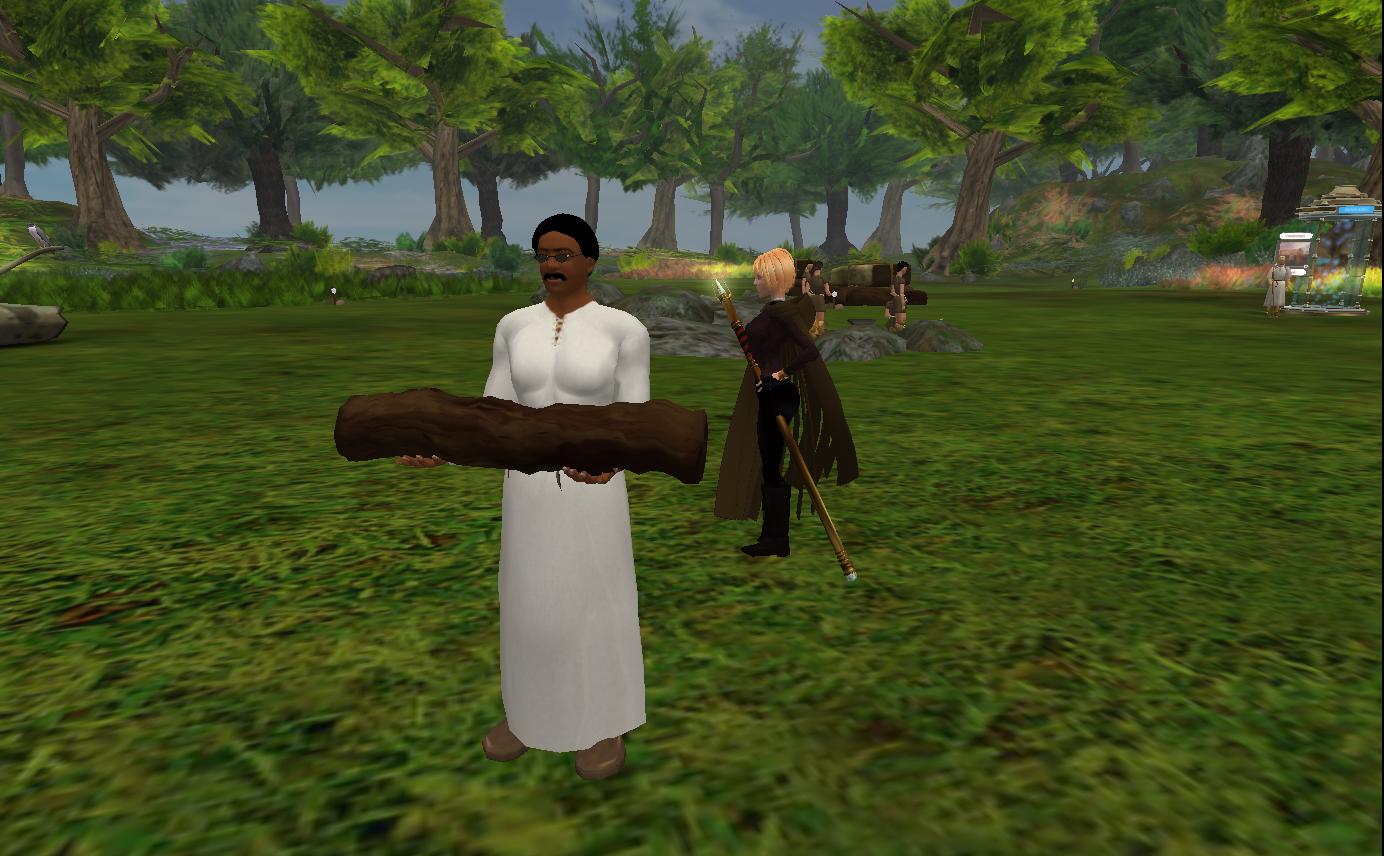
IMAGE 1: Capture from Heritage Key of a clearing in a woods scene of a male avatar
carrying a log to assist in the building of Stonehenge. A further
female Indiana-Jone type character (that was me) is seen just behind.
Circa 2010.
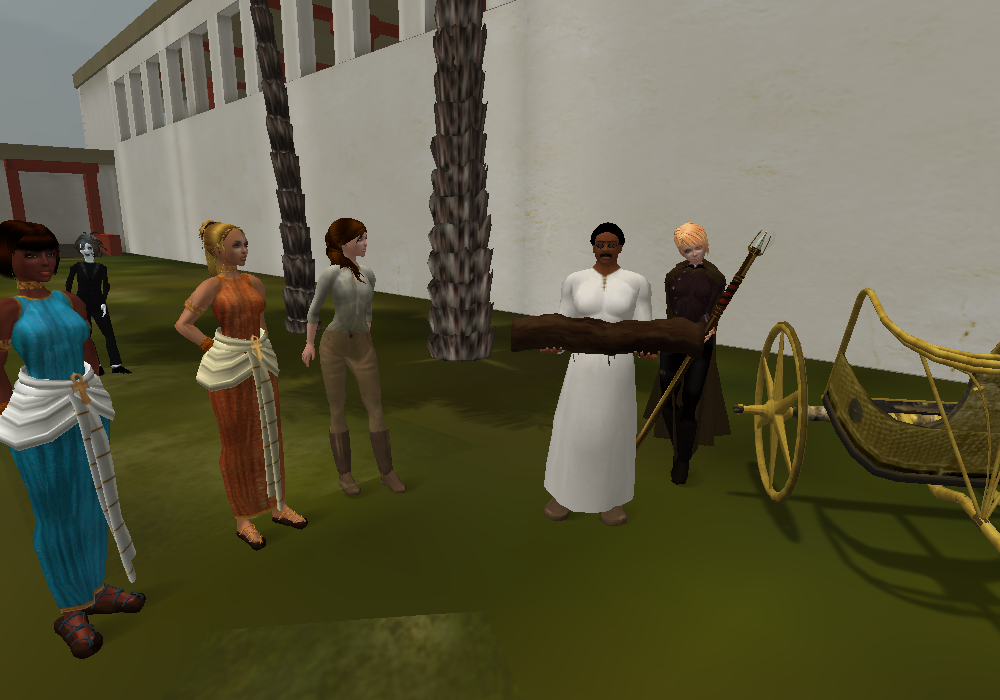
IMAGE 2: Capture from
Heritage Key tour that I believe Virtual Worlds Education Roundtable
took back in 2010. Image shows a scene in Thebes between palaces and
temples. Avatars are dressed in Egyptian, Druid, or Indiana Jones-like
apparel.
Happy Twelvetide! Number 2 on my 12 favorite XR-for-education list is NASA goes to Mars! My fav parts? – Users had first person experiences walking around a Martian base in 2008. –
This kind of build checks every one of my ‘saves time, money, danger’
boxes and as such, represents a great investment in XR. Experiences like
this should be replicated. Yes, this
is another defunct XR location, however there are still space clubs in
Second Life and other platforms have picked up the gauntlet to recreate
Mars, the Moon, and beyond. Is NASA
done with virtual reality? Far from it. She’s just grown with the times.
One of my favorite XR-for-education things that NASA has done recently
is the First Woman graphic novel (comic book) demonstrating the
diversity of thought that it will take to get successfully back to the
moon. It’s XR-enabled and I’m happy to report that RT (the waving robot)
has visited my living room.
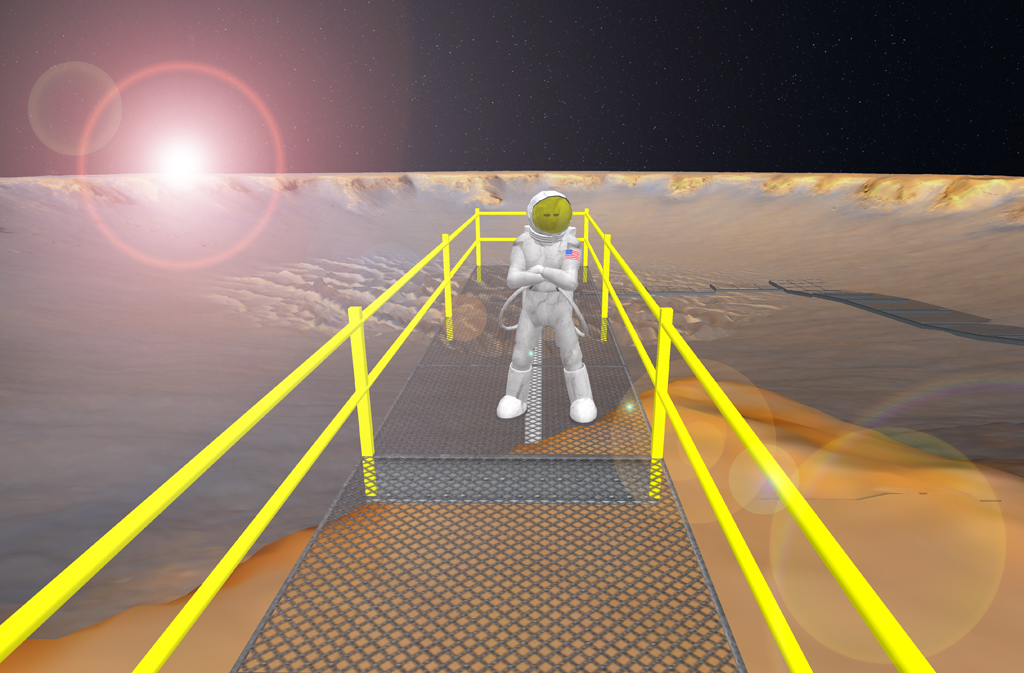
IMAGE 1: Capture from NASA CoLab recreation of
the Victoria Crater on Mars. Capture credit: Eric Hackathorn, NOAA,
February 22 2008. Source:https://lnkd.in/gWFu7aKnImage is in the public domain.
IMAGE
2: Capture from NASA website about First Woman. Comic book style scene
from the angle of moon boots shows a nearby moon rover with a robot
waving in the back seat.
IMAGE 3: Capture of cover of the First Woman, NASA’s Promise To Humanity, Issue Number 1 Dream to Reality graphic novel.
Happy Day 3 of the 12 Days of Christmas! Today’s favorite XR-for-education example is for the curious#InstructionalDesignersout there, wondering “how do you design instruction in#VirtualReality?” I
suggest this example from the Grand Cache Tourism and Interpretive
Centre, that I saw demonstrated by Mike McCready of Lethbridge College,
Alberta. This is the best example of instructions given in a VR
experience that I’ve seen! I
should disclose my judging bias– I have taken many science labs in my
time and a good set of lab instructions is a good set of instructions.
Full stop. So these are good instructions. Direct, to the point, and
helpful for completing the task at hand. Not too much detail in the
objects presented to the learners and completing the lab *should* be
within the physical capabilities of VR controllers (grabbing, placing,
brushing, etc). Modification of target sizes could be done for#Accessibility.
I’m guessing that the VR artist and developer, Benjamin Blackwell,
transposed real life lab instructions. I could be wrong, maybe someone
wrote these instructions for the VR experience. But hey, either way, it
works! The
backstory of this VR experience isn’t bad either as it DOES tick
Heather’s boxes of saving time, money, and danger. The real world
dinosaur footprints are up on a sheer rock face at an angle in a
preservation area. Getting there takes time, doing a dinosaur imprint
IRL costs money (for supplies), and the location itself is dangerous to
learners (and to environmental & historical damage). (Source:https://lnkd.in/gcWjFBXb) There’s
a chance I would suggest adding an element that increases the stress
level for learners (what??) but that’s just to add a narrative to the
experience. I would throw in an approaching thunderstorm that the
learners have to boogie and get out of the site ASAP. But hey, I like
narratives with my educational XR. I do not endorse any Lethbridge College program.
IMAGE: Capture showing entry instructions for VR controllers.
IMAGE
3: Capture of prep table for taking a plaster cast of a dinosaur
imprint. Equipment on the table includes a bag to carry the supplies up
to the footprint location.
IMAGE 4:
Capture showing that learners have to use a spray (I think it was an
adhesive) to position the frame in place to hold the plaster.
IMAGE 5: Capture of the user grabbing the wooden frame to place over the footprint.
IMAGE 6: Capture from a Lethbridge College site showing the angled sheer rock face with the dinosaur footprints.
Happy Day 4 of Twelvetide, where I’m sharing 12
of my XR-for-education favorites! Today’s example is a concept– XR for
distraction/pain management.
I’ll admit
that this example is tangentially associated with education. But two of
the three examples I’m sharing are targeted for children. So in a way,
VR is part of helping the children learn to live healthier lives! 1.
VR Vaccines – using VR to distract children during vaccine
administration. Combine this with the “Buzzy” concept and I think the
entire fear of needles (for anyone) could be eliminated!https://lnkd.in/gQsn39W9 2.
VR in a MRI – LOVE this but it’s still experimental. My favorite part
of this design is that the clicks and whir sounds are incorporated INTO
the VR experience. (Learning what the “sounds” mean is part of fear of
flying courses so I think this could be incorporated into future virtual
reality fear of flying experiences too.)https://lnkd.in/gZ6xnPEz 3.
VR for pain management. There are several companies working on this and
kudos to ALL OF THEM! But I’ll shine a light on my friendHeather Bucalos, RNand her advocacy of using it for hospital patients (https://lnkd.in/g8s7q4_y). It looks likeBeth Savoldellihas a new initiative coming up in 2024, the XR Impact Network. Best wishes to all!
IMAGE
2: Capture from inside VR Vaccines where the user is about to have a
special stone placed on their arm at the same timing as a vaccination.
The user is presented with a story about how the stone “protects” them.
IMAGE
3: VR use during an MRI. Experimental but includes the typical sounds
of an MRI and particularly helpful for children to stay still and calm
during the procedure.
For Day 5 of Twelvetide, where I’m sharing 12 of
my XR-for-education favorites, I list National Geographic Explore VR,
whose name, perhaps in a clever move, puts the “VR” in the right
place…last. It just HAPPENS to occur inside the media of VR, but the
star of the show IS the Nat Geo content. My favs of this? This puts the explore in Explore VR. Basically if you want to use VR to go places, this is your golden ticket. Plus,
there is an impressive story line (I’m referring ONLY to the Antarctica
experience here): going from a ship, via kayak, to an ice shelf,
climbing it, and then waiting out an Antarctic storm in a camp.
(Playthrough video here:https://lnkd.in/ggMtNxy8) When I taught an Introduction to XR (Design) course using the Quest 2s (https://lnkd.in/gYi9RWCU),
I placed Nat Geo as the very first experience in the course after the
Oculus First Steps primer. I also framed it within the design element of
Function. That is, does the experience take advantage of VR
affordances? If not, could it be done some other way just as well? In
the case of exploring, there is a long history of high quality National
Geographic TV shows. Could doing something in VR measure up? In
this case, the learner has to paddle their kayak, choose and take their
own photos (they are on a mission from Nat Geo, of course, to get
photographs), and climb an ice shelf. Either way, it’s arm work! So
the user is not simply a viewer as would be for a TV show. There are a
few folks right here that would like to pipe up and state that the
movement *causes* learning or as I saw it phrased the other day: “It
feels more like an earned learned experience than something you
passively learned about or were informed about,” Bill Briggs, Deloitte
CTO, told VentureBeat. “The retention and recall is just higher. Your
brain is storing it in a different place.” That’s a bunch of horse hockey. Your
brain is storing it in a different place? Oh, like that prepper
pantry? Experiences ARE experiences. Full stop. The brain encodes them
exactly the same, whether they are in VR or IRL. What this person was
doing was a backhand slap at traditional instruction (code word:
passive), which (according to them) has been dreadful for ages. On
behalf of all teachers…thanks? (not really, grr) But
I digress. Back to enjoying Nat Geo because they did a good job. It’s a
good starter experience if you can afford it for your learners. It’s
listed at US$9.99 in the Meta Quest store.
IMAGE: Capture from inside of Explore VR looking down to see some whales in a small bay dotted with icebergs.
IMAGE: Capture from the Meta Quest store of the purchase page from National Geographic Explore VR.
Trigger warning: today’s entry refers to sexual violence.
I went to an entrepreneurial conference last year to speak on the topic of the metaverse. I know my ad hoc speaking style (which I enjoy but I lose my train of thought), so in advance I scribbled up a list of truly GREAT applications of virtual reality so that I could glance at it. Today’s entry made that list.
A VR for conflict-related sexual violence (CRSV) pilot study includes everything from seeing a courtroom in advance, seeing visual assurances of identity protection, reenactments, and post trauma healing and comfort. I see it is still in the experimental stage but the results are about to come in.
In September 2019, I was sexually attacked. I had to describe the event to the State Police three times. A friend rushed to me, took one look at me, and said that I was in shock. The shock goes on for a long time. I can only imagine what circumstances are like when sexual attacks occur as part of conflict or war. Therefore, I wish this pilot Godspeed.
Good on yer to the sponsors: The Royal College of Art, Immersonal, Frontier Tech Hub, UK International Development, and the Office of the Prosecutor of the International Criminal Court.
Day 7 from my 12 Days of Christmas favorite VR-for-education examples is a multi-step process. We have to time travel back. I’m going to stop our time machine at 14 years ago, the year 2010. NOAA had built their 2nd iteration of a tsunami simulation on their Second Life island, Meteora, that my old friend and colleague AJ Kelton captured in video here: https://lnkd.in/dCNDXnAH. (To see an even OLDER version of the same simulation, see video here https://lnkd.in/d2csDTyA) On the timeline, 2004 the Indian Ocean earthquake and tsunami was just 6 years prior when an estimated 227,000 people died (https://lnkd.in/du6sTWGt)
OK, Heather, this looks chunky and old. What’s the deal?
The point is that NOAA only built 5 experiences in VR– and a tsunami remained one of them (https://lnkd.in/dGD62bv6). I’m going to go out on a limb and state that NOAA thought it was *important* that humanity learn what tsunamis are and why you just can’t “outrun them”.
Why was XR a good choice for this particular natural hazard?
Because in XR, the viewer can stand still and let the tsunami wash over them and get a hint at it’s height, power, and devastation. (Hat tip to the movie, The Impossible for their depiction here https://lnkd.in/dSx-PHnv). READ: Avatar height actually means something here.
Time machine forward to 2011, March 11 and the Great East Japan Earthquake. (https://lnkd.in/djjVKSsP ) For the first time, humanity would see in real terms the devastation of a tsunami.
Fast forward one more time to 2016 and simulations advanced to this stage (see video clip below). By now, humanity had begun to take tsunamis MUCH more seriously with early warning buoys, escape routes, and *hopefully* people evacuating the coast when it could happen.
Do you see the connection between SEEING what a tsunami could do and future safety? Humans have a habit of clinging to “seeing is believing.”
It is areas like this that hit my 3-item (time, money, danger) checklist hard and for the good: XR for reducing danger.
In a sad twist, I’m late getting this posted on January 3 and another earthquake and tsunami occurred in Japan on the day I should have posted this, January 1, 2024. Thankfully, it appears that warnings went up fast and folks did evacuate. (Edit: I’ve now heard that at least 200+ people have died.)
In summary, we can’t look at this Day 7 example outside of its historical context. More emphasis on the real dangers of tsunamis can save lives.
Day 8 of my Twelvetide favorite examples of XR-for-education is a true favorite. If you’ve never been in the metaverse, I’ll take you here first: the Apart Gallery.
4. Click Accept to agree to your avatar. (Yup, you can change it here if you want or you can change it later, either way. Because metaverse!)
5. Turning on mics is optional so you can skip that if you want. Click on Enter Room.
See? 5 Clicks. And if you’ve been in before, it’s actually 4 clicks b/c your browser will remember you.
This is WebXR, the spatial web, or the immersive web. Names are not yet nailed down because it’s still relatively new. You entered the metaverse with your browser. That doesn’t sound like much, but to gamers, it’s a big deal.
Gamers are used to:
– Large downloads
– Required log-ins
– Running extra programs for sound or dialog.
– Turning off other programs to preserve memory and increase speed.
– All kinds of special doohickeys.
In this example, hosted by Mozilla Hubs, you don’t need to do any of that. You are free as a bird! (Movement is with your W,A,S,D keys and your mouse).
This *particular* example is on my list of favorites because of this ease of entry. It’s the comfortable on-ramp into the metaverse. 🚗
But there is one OTHER reason why I take newbies to the Apart Gallery. It’s an art gallery and it’s a time capsule of a sliver of American time. The original gallery artwork was produced between February and April 2020. Think back to what we were doing then:
– Social distancing
– Stay home
– Wash your hands
We were NOT talking about immunizations, unnecessary lock downs, and vulnerable populations. We didn’t even know COVID could be airborne. The artwork reflects the public health propaganda of those months. I use that word NEUTRALLY, not in a negative way. (I’m FOR public health!!) The word propaganda to me means “relaying an idea that you want someone to agree with”. Another word might be “rhetoric”. It’s fascinating to look back on what we were telling each other might work. Truly, we have our own stories now, just like the haunting stories from the 1918 flu.
The great folks at Paradowski Creative have since expanded the build so if you have time, wander around a bit. Not every version of the coming metaverse will be Second Life 2.0 ( 😏 ).
Today’s entry in my 12 Days of Christmas favorite XR-for-education examples is an odd one. For all those independent projects, developers, and small teams slogging away on tiny VR experiences and wondering…does anyone notice this?
My answer is YES.
I received exposure to the Naturalist’s Workshop (from North Carolina State University and the North Carolina Museum of Natural Sciences https://lnkd.in/duyS4xaW ) via a colleague. While I’m sure it’s great for learning some basic tree identification (yes!) I liked it for the basic design and how I could use THIS design to teach some elements of basic spatial design to others. How do you situate a learner in a virtual space? How close is everything? How far away? Does the learner have to walk?
I didn’t use this experience with any instructions. It was just headset on, app on, and go. So I didn’t even know it had a name or purpose. I was plopped in a small clearing in a forest on a slightly elevated concrete-looking platform with a desk and some stuff.
I did some basic spatial awareness practice. I looked at my hands. I looked at my feet. I looked to the front, to the left, to the right, behind me, below me, and above me (oh! Nice opening the tree canopy). I looked at my stomach (missing. huh.) So users have no avatars. But they don’t need them to identify trees, do they? Even though the area is closed in, it did NOT feel claustrophobic at all…because trees just fade off into the distance. The color theme is a bright spring green. The platform had a low knee-level wall and 2 gaps for going out into the forest (cough, expansion plans please!)
I bent down and looked under the desk and then discovered that the desk drawers do open! Hey there is stuff inside! So I started to pick those things up and when I placed them on the desk, something happened. Sometimes, I was temporarily transported to a 360 degree photo with one tree dominant in my view. Oh! I had placed an object FROM the tree (a leaf or a seed) into a place and could learn more about it! Level 1 tree identification unlocked.
You can get this app via SideQuest.
It’s paced at 5-15 minutes. I assume the 5 minute-rs would know what they are doing. I’d say it’s nicely at the 20 minute mark if you want to fool around.
It’s little projects like this (and the Dinosaur Track cast from Day 3) that are actually moving us forward in the XR for learning market. It doesn’t escape me that both were built in partnership between a university and a museum. Are you writing this down? You should be.
Happy Day 10 of the 12 Days of Christmas! You’re
probably getting tired of this by now, aren’t you? But we are almost to
the end! For today, my favorite
example of XR-for-education is back to a concept– NOT a specific
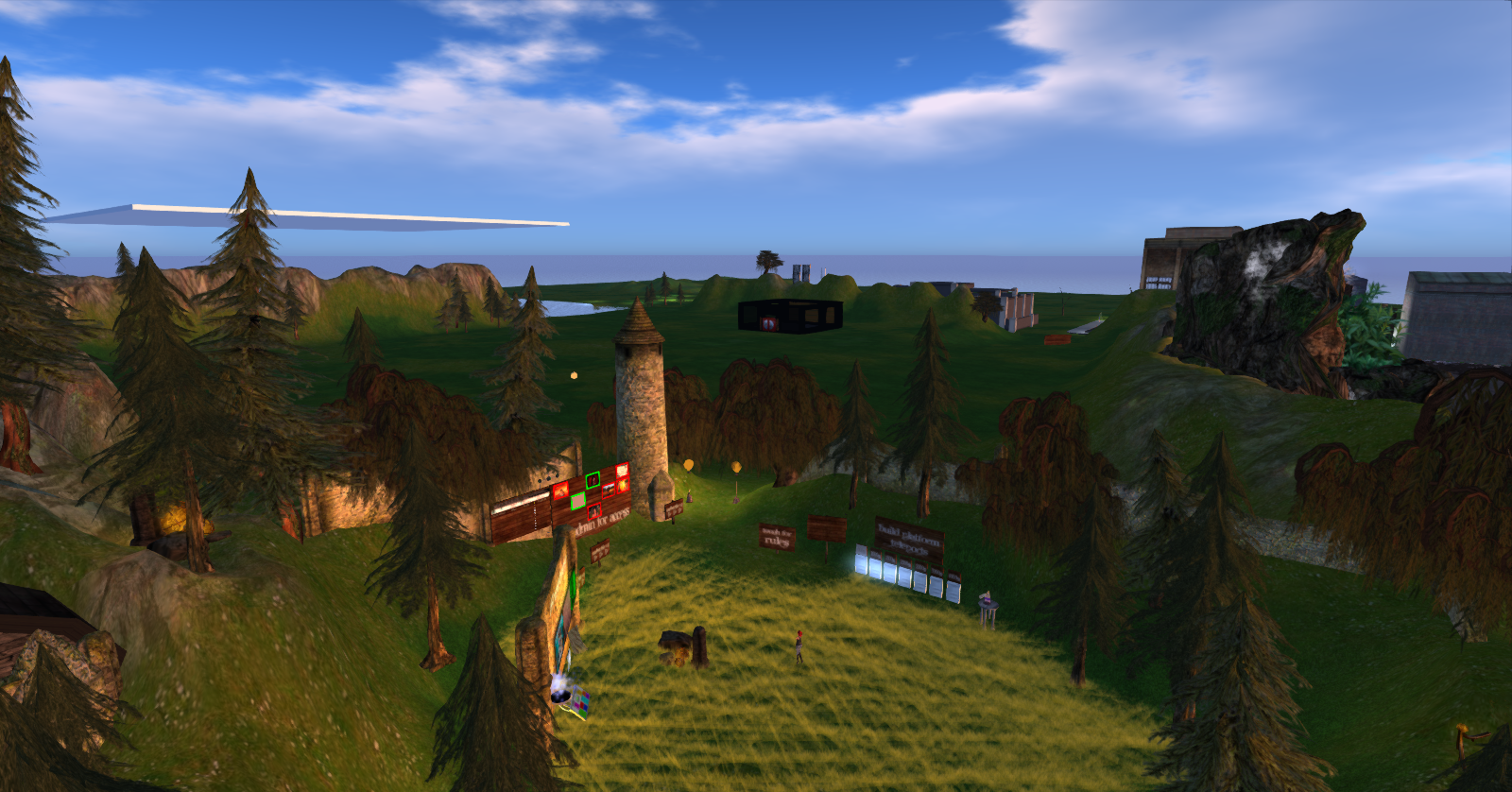
platform, app, or game. The concept is sandboxes. No,
these are not virtual boxes on the ground filled with sand. These are
locations in virtual reality where users are endowed as creators.
Virtual reality needs these spaces. I’m reminded of the name of one of
my favorite Facebook groups, I Require Art. I feel like that name needs a
second clause “like I need air.” Virtual reality needs places where
users of any kind can experiment. I’m
going to name 2 platforms because they meet this standard: Upon entry,
users are endowed as creators. Of course, it often matters where you are
standing. You can’t just create anywhere and everywhere. You must have
wisdom about this. When I first
described Second Life to my best educational psychology friend and said
“All users are endowed as creators”, he quipped back “Oh, you all can
have God complexes!” God, I loved working with that guy. He both kept me
grounded and pointed to the stars. But,
yes, users can have God complexes. Or to put it more finely, users can
explore their desires to create, to shape their world, to build, to
paint, to sculpt, to cook, or do all kinds of creative things that
humans have been doing for millennia. I
used to have a tiny patch of ground in Second Life, thanks to a grant
to educators via Montclair State University in New Jersey. I could
build whatever I wanted (that was free b/c I was cheap). I set up a
free pavilion, campfire, and space-pod office where-in I placed a
Tiffany lamp and tiny velociraptor, as one would do. It wasn’t much,
but it was my space. I found that this location (https://lnkd.in/ek8h-22F) does
a good job of explaining a virtual sandbox. I don’t know them, but they
show the connection between space available, what you can do (rules),
and technical specifications (prim/polygon or memory sizes).
In
the world of WebXR, Hubs allows for users to be creators from their
first moment. As long as the space you are inside of standing allows it,
you can bring in your own .glb files or surf over to Sketchfab. What’s my fav? Humans
are creators. We bring order to chaos. The freedom to create is
important and yes, I think it is as important as air is to breathing.
None of our other human endeavors would have value if we didn’t have art
to express meaning. Onward artists, onward! Post
script: You might not know that most XR platforms do not endow users as
creators. There could be costs, permissions, or it is simply not
available. That’s why this feature is remarkable. (I actually do NOT know the platform Sandbox VR and this post does not constitute an endorsement.)
Day 11 of the 12 Days of Christmas of my favorite XR-for-education examples! Today is another “concept”– it is action. I have some colleagues in the XR industry that believe that movement in XR is the best possible affordance of XR. I have disagreed with them.
See one example where a researcher hypothesized that movement in XR would cause more learning and then (gasp!) found that it made no difference: Johnson‐Glenberg, M. C., Bartolomea, H., & Kalina, E. (2021). Platform is not destiny: Embodied learning effects comparing 2D desktop to 3D virtual reality STEM experiences. Journal of Computer Assisted Learning, 37(5), 1263-1284.
But today I’m splitting that action hair super fine.
I’m actually FOR movement in XR when it facilitates learning. Said another way: when all other media choices would not allow for equivalent movement in a situation (or if movement in XR is a brand new thing under the sun), movement, then, in XR is, yes, helpful. I would not say it is the end-all be-all of XR-for-learning but it can help (facilitate) learning. I’m hinting at neuroscience and body memory.
For example, using XR before approaching a large, moving, and dangerous piece of equipment like a windmill to learn maintenance. YES. This is a good use of movement in XR because it makes something happen that no other form of media would easily do (not a drone or first person GoPro video). If it would be dangerous to approach with zero training, XR can provide action practice use of the equipment in a safe way.
Want some sources to support that?
Here you go:
Students at the University of East London practice using PCR equipment in XR before using it in real life. https://lnkd.in/eKhkRWks
Potential workers in windmill maintenance get exposed to the work conditions in XR to decide if they really want to pursue this career
And the now somewhat buried Lowe’s Home Improvement Store use of VR to teach skills like bathroom tiling to customers https://lnkd.in/emJF7KRr
Other versions of “action” include programs like Tiltbrush or possibly GravitySketch that allow users to move and create from inside of XR, not on the outside and bring art of object creations into XR like is the current method with programs like Unity, Unreal, and Blender.
The key to remember here is: compare the XR experience to its closest cognitively competitor experience. (READ: if the experience is processed in the brain the same way). If XR is faster or cheaper or safer than that competitor choice, XR is the way to go.
Video clip from Simulwind. Capture shows the user selecting and placing the correct size wrench to open an equipment panel.
Last but far from least, my 12th favorite XR-for-education example has, as far as I discern right now, the strongest connection between USE and LEARNING. (Translation: a safe bet!)
It’s XR for the emergency and military services– fire, medical, police, and military. As the daughter of a fire instructor, this use just makes me smile. I’m sure my Dad would have LOVED this. He loved teaching and learning via fire simulations– there was no time his skills shone brighter than helping trainee firefighters learn things like fire behavior, untapped rural water sources, and fire site safety. I’m sure I got my “adult educator” genes from him.
By now, I don’t have to tell you how XR for training uses here ticks every box of saving time, saving money, and reducing danger.
But I’ll spend this last moment on the list hinting – indeed – to the intriguing research connection here. What is it about emergency situations that makes XR work so well? I don’t know! The emotional hype? The practice-so-many-times-until-you-can-do-it-in-your-sleep-ness? The visual SEEING of emergency situations– and living thereafter?
So much cool depth to explore here, but in the meantime, using XR for these uses has my endorsement. May we never need these services, but I’m glad that our service people are getting well trained in the meantime.
Ending my 12 Days of Christmas on Epiphany (whew!) I wish you the gifts of peace, happiness, and good health in the New Year!



.png)









Happy Day 10 of the 12 Days of Christmas! You’re
probably getting tired of this by now, aren’t you? But we are almost to
the end!
For today, my favorite
example of XR-for-education is back to a concept– NOT a specific
platform, app, or game. The concept is sandboxes.
No,
these are not virtual boxes on the ground filled with sand. These are
locations in virtual reality where users are endowed as creators.
Virtual reality needs these spaces. I’m reminded of the name of one of
my favorite Facebook groups, I Require Art. I feel like that name needs a
second clause “like I need air.” Virtual reality needs places where
users of any kind can experiment.
I’m
going to name 2 platforms because they meet this standard: Upon entry,
users are endowed as creators. Of course, it often matters where you are
standing. You can’t just create anywhere and everywhere. You must have
wisdom about this.
When I first
described Second Life to my best educational psychology friend and said
“All users are endowed as creators”, he quipped back “Oh, you all can
have God complexes!” God, I loved working with that guy. He both kept me
grounded and pointed to the stars.
But,
yes, users can have God complexes. Or to put it more finely, users can
explore their desires to create, to shape their world, to build, to
paint, to sculpt, to cook, or do all kinds of creative things that
humans have been doing for millennia.
I
used to have a tiny patch of ground in Second Life, thanks to a grant
to educators via Montclair State University in New Jersey. I could
build whatever I wanted (that was free b/c I was cheap). I set up a
free pavilion, campfire, and space-pod office where-in I placed a
Tiffany lamp and tiny velociraptor, as one would do. It wasn’t much,
but it was my space.
I found that this location (https://lnkd.in/ek8h-22F) does
a good job of explaining a virtual sandbox. I don’t know them, but they
show the connection between space available, what you can do (rules),
and technical specifications (prim/polygon or memory sizes).