Tag: edtech

  • Does ChatGPT Enhance Student Learning?

    Does ChatGPT Enhance Student Learning?

    Not in 2026, it doesn’t.

    ChatGPT enhances academic performance.

    ChatGPT boosts affective motivational states.

    ChatGPT improves higher-order thinking propensities.

    ChatGPT reduces mental effort.

    Source: Does ChatGPT Enhance Student Learning? A Meta-analysis (Deng, et al., 2025).

    All of these statements, however, are ‘bent’ and are not necessarily true. Why? Watch the video below.

    TL:DR

    • It’s too early to conduct an AI meta-analysis.
    • Effect size is actually 0.25, with no statistical significance.
    • Authors did not include papers that show ChatGPT caused harm.

    Thus:

    • Not all research is created equally.
    • Not all data are created equal.
    • Knowledge takes time.
    • Lying with data is super easy.

    I’m sharing this because many folks disregard reading research papers altogether and will only hear the headline. Others will only read abstracts. Others will not recognize that the published paper’s research was essentially bad.


    Sources matter.

    Legitimate sources matter.

    Research methodology matters.


    It’s a tough world to navigate, instructional designers.

    Let’s be careful out there. 👮♂️

  • From Myths To Principles: Navigating Instructional Design in Immersive Environments Part 1 Introduction

    From Myths To Principles: Navigating Instructional Design in Immersive Environments Part 1 Introduction

    From Myths to Principles: Navigating Instructional Design in Immersive Environments

    Part 1 Introduction

    Decorative image with text: From Myths To Principles: Navigating Instructional Design in Immersive Environments with image of cloaked traveler on a mountian looking towards a break in gray clouds towards some buildings.

    This article begins a new series where I intend to continue to bust myths related to learning in immersive environments while also advocating for research-based decisions related to instructional design.

    Now if that sounded like gobbly-gook, this might not be the series for you. But, for anyone with an interest in virtual worlds, the metaverse, or even a simple 2D simulation and the uses of these for education, this is the RIGHT place for you.
     
    This is an updated version of my original 8-part Instructional Design in the Metaverse series. (Did you miss that? Here’s my 3 minute explainer video.) I estimate that I have at least 15 parts right now to start this series and new research comes in every day. However, this being my blog, I intend to spill a little more tea here than I do in other places.

    Buckle up buttercups
    !


    (more…)

  • Instructional Design in the Metaverse Part 6 What is Different?

    Instructional Design in the Metaverse Part 6 What is Different?


    Decorative image with text: Instructional Design in the Metaverse. Our metaverse explorer leaves the laboratory with the secrets to design and she heads out into the dark world.

    Welcome to Part 6! Are you alive? By my calculation, when this goes live, 3 intrepid souls have read all of Parts 1-5 before this. (Insert laughter with tears). Indeed, you may have found this in isolation of the other parts! That’s OK, I’m cool with modularization. Feel free to “go around the Horn” at some other point in the future and read Parts 1-5 later.

    Oh! And, for those 3 travelers AND everyone else, I am making an explainer video of all of this content. But it comes with 2 caveats:

    1. No references or quotes. Just ideas.

    2. Because it moves with a preset piece of music, each idea will have a limited amount of screen time: 2.4 seconds, to be precise.

    Finally, I’ll probably write a full BTS (Behind The Scenes) on this article series on my blog. For those of you that love BTS content, that one will be for you. Translation: these articles were NOT written to be sound-bite worthy.  What I write in the BTS will be.

    This is basically the second of two parts that were originally together: Part 5 is what is the SAME about designing between 2D and 3D and this is what is different.

    Long story short?

    Here is where the fun begins.

    Gif of Anakin Skywalker saying This is where the fun begins.

    2D to 3D: What Is Different

    A learner could learn from a book how to enter a store and buy something. A learner could also learn from entering a real store and buying something. Both are ways to complete the learning, but the designs– that is, how to structure the learning from start to finish, will be different. The book is analogous to direct instruction. There are times when direct instruction will be the better approach. The real store is analogous to experiential learning. There are times when experiential learning will be the better approach. The approaches are different; there is no inherently better approach for all situations.  

    These elements in this section are not meant to imply that they exclusively belong to XR media. That is, many other forms of media contain these same elements. These items are listed here because they are often found within and indeed are combined in design solutions in XR.

    1 Narrative Plot

    Clark and Mayer observed that humans are sense makers and attempt to derive meaning from life experiences (2016). Learners engage in making meaningful connections when words and pictures align during experiences. Meaning is also deeply embedded in the storytelling approach, where it is often the journey that the protagonist goes through that remains memorable long after a story has ended. D. Clark argued, “learning experiences are exactly that, experiences designed to change us, specifically our long term memories” (2022, p. 7). Further, D. Clark advocated for a balanced use of storytelling, explaining that it can bring life to dry information, but should not be overused and wander into a “Disneyfication of learning as entertainment” (2022, p. 7). Lastly, D. Clark argued that stories for learning should be designed as “always beginnings, never ends-in-themselves” if the learning is to be applicable beyond the experience, into the “long tail of practice, transfer, and performance” (2022, p. 7).

    Points for poetry, D. Clark! 

     â€œalways beginnings, never ends-in-themselves”


    Decorative Image: Our metaverse explorer is exchanging stories with other storytellers.

    Humans crave stories that bring meaning


    Indeed, the storytelling approach in learning pulls the learner through the experience. To use storytelling, the learner should experience a flow through their experience, a beginning and middle of the story. The end could happen in XR or more substantially outside of XR into desired application. The learning experience should be planned and not haphazard. Learners should be guided on a planned route. XR storytelling can be first person or group experiences. Regardless, each learner is a protagonist; their decisions determine what they will experience. Recalling the constructivist learning theory foundation, what the learners experience becomes the learning experience that is being designed for. If learners are exposed to situations where they actively construct their knowledge, then the reality that the learners construct was constructed by them, not constructed by the media or by others. Further, learners do not arrive as empty vessels to be passively filled with information if they are the protagonists of their own learning event. Learners add, sort, emphasize, or suppress new experiences when compared to old experiences.  Subsequently, a learner already experienced in real life (non-XR) is bringing those experiences into XR with them. In summary, learners arrive already ready to experience a story. Thus, narrative plot or a story arc is a good approach to XR instructional design.

    Plot, narrative, or narrative plot are all descriptions of phases within storytelling. There are slight variances in names but the phases generally focus on the user’s (or in our case, the learner’s) experience (Lichaw, 2016). 

    Narrative Plot steps from Lichaw: Exposition, Inciting incident,  Rising action, Crisis, Climax, Denoument, End.

    If you remember nothing else about designing educational XR, remember this.  Credit: Lichaw, 2016.

    These phases describe what is happening to the protagonist. In the case of XR, the learner is the star and they should be brought through these phases in an effective design plan. Table 1 compares a storytelling arc with the Pixar story arc, a story arc example of Cinderella, an XR story arc, and an XR narrative plot example. 

    Examples of the storytelling arc of 6 steps: Literary, Pixar, Cinderella, XR template, and XR example

    Examples of the storytelling arc of 6 steps: Literary, Pixar, Cinderella, XR template, and XR example

    Pixar story arc from Khan Academy. (2017). Pixar in a box: Introduction to storytelling [Video]. YouTube. https://youtu.be/1rMnzNZkIX0 Cinderella story arc derived from Kurt Vonnegut, as documented by Derek Sivers. (2009, September 1). https://sive.rs/drama

    Example of Narrative Plot in XR

    Introduction. The who, what, where, why, when of the experience is explained. The scene opens. This starts before the digital experience begins and lasts 30 seconds to a few minutes into the experience, depending on how much needs to be explained. This is the beginning of the exposition.

    Set the scene. Provide guidance on the affordances within the experience, how to communicate, walk, navigate, where is help (e.g. where is a digital companion). The learner is invited to move, change appearance, and communicate.

    Dilemma. Introduce the conflict or the scenario that the learner will participate in. The learner is presented with a challenge or problem. This is the inciting incident and rising action phases. This can be a great time to guide and practice small solutions to small problems.

    Crisis. The learner must act and initiate some sort of change. It is action-oriented, and the learner is on center stage.

    Change or Denouement. The results of the change have an impact on consequences or the environment. Said another way, the change ripples through the experience to change it for the learner. The results are non-trivial and not haphazard.

    Resolution or End. The mission is complete, and the world has changed around the learner. The learner is living out the consequences of their decision.

    Some research has shown that most of the instructional emphasis does not need to be within the XR experience itself. Dede (2021), when reflecting on what he now believes after over five decades of immersive learning research, said:

    “I used to believe that if you had resources, you should spend 95% of the resources on the immersive experience and then you just do a little thinking about what kind of induction you use before people go into immersion and what kind of post experience debriefing you do.  I’ve come to believe now that the induction and debriefing is where the learning takes place predominantly, and so designing those is very important.”

    This indicates the importance of the on-boarding and the follow up experiences. The story of an experience begins before something is activated and ends long after.

    The main point of keeping a narrative plot mindset in ID XR design is to keep the learner at the center of the experience. Every step of the narrative plot approach focuses on what the protagonist- that is, the learner- experiences: dilemmas, crisis, change, etc. This approach, then, keeps the ID focused on the learner’s experience, not the technology. For example, let’s say a platform can recreate the school environment down to the desks and chairs. An ID might reason, ‘This a great place to hold a class! I can assign classes to virtual rooms and the instructor can use web-sharing boards.’ 


    Capture of a classroom in virtual reality, complete with desks, chairs, and chalkboard.

    Don’t try this in VR

    That approach puts the technology first and does not consider the learner. It also recreates the problems of regular in-person classrooms and throws in a few more virtual problems as well (i.e., poor internet connections might have avatars distractedly appearing and disappearing). Rather, a learner-centric approach might ask “What is the main experience or emotion that the instructor wants the learners to have in this lesson?” As Mayer stated, “How can we adapt multimedia technology to aid human cognition?” (2020, p. 15). This might cause the ID to look at the entire XR event differently and not recommend a virtual classroom. There is more on emotion in design in Section 5.2.

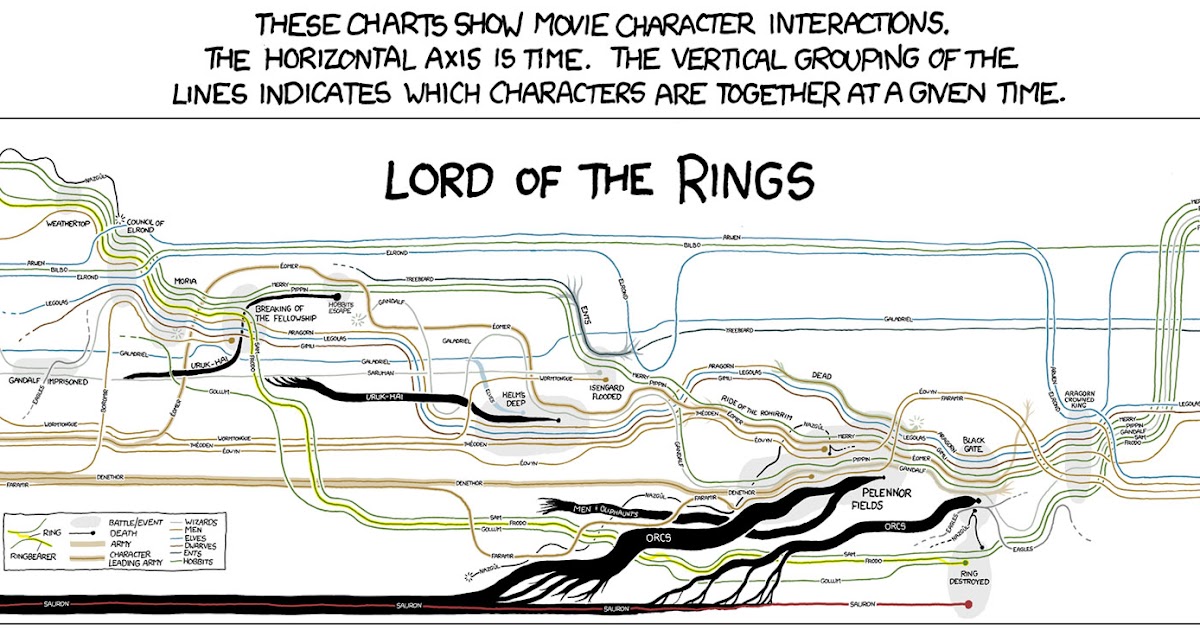
    Lord of the Rings Narrative Plot Diagram. Basical huge spaghetti.

     Credit: https://fbvisualisation.blogspot.com/2014/04/narrative-charts-tell-tale.html

    2 Visual and Sound Range

    For the ID, the added visual depth and sound possibilities beyond 2D must be designed. However, more to design means more risk. With XR, the added ability to put information anywhere has more risk of overwhelming the learner than helping the learner. Indeed, D. Clark (2022) agrees that Mayer’s Principles lean towards less is more.

    2.1 Visuals

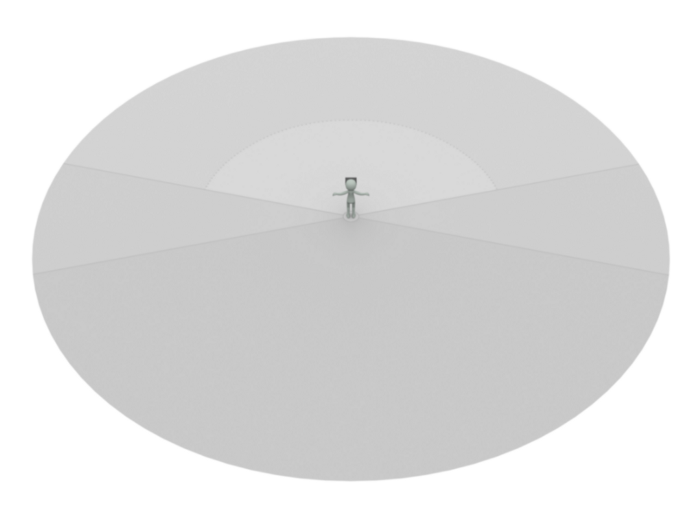
    Alger (2015) noted these basic principles for visual range called the Comfortable Content Zone: 77 degrees of viewing range side to side and a range of 0.5 to 20 meters in depth. There are Periphery Zones to the sides and above, but the learner should be only prompted to use those. 

    Diagram showing that main content should be placed between 0.5m and 20m to the front of the user. The sides are the peripheral zone and the back/behind is the curiosity zone. Anything within 0.5 of the user is the no-no zone, meaning put nothing there.

     Credit: Alger, 2015

    This reflects real life. If one was working at a workstation, critical information would be within easy viewing and reach. Other information could be available in what Alger calls the Curiosity Zone – behind and below the learner, but learners should be prompted, as in real life, by sound, light, or foreknowledge, to engage with that non-obvious space (2015).

    Alger (2015) further proposes that the visual hierarchy matches the importance of information. To find information in 3D, we look at the center ahead first, then left and right, then below, then above, then finally at our own bodies. Everything above eye level is for things beyond the learner’s control like weather, time, or authority notifications. Everything at or below eye level is within the learner’s control.

    Caption describes gif.
    Basic visualization of where a VR user would look for something; first center ahead, then left and right, then above and finally at the user’s own body.

    These user interface principles skew towards conservatism in detail; less is better. IDs should design minimal spaces, with prompts, and within easy arm reach. IDs can create storyboards with isomorphic qualities that both curve around the learner and contain planning space for the foreground, mid-ground, and background visuals.

    Capture showing how designs expand between foreground, midground and background.

    Credit: Alger, 2015.
     
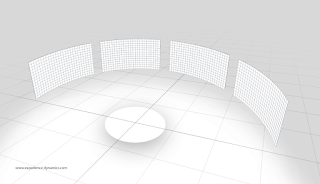
    Credit for below: ExperienceDynamics.com but I received these XR storyboards from the Interaction Design Foundation.
    XR storyboards, blank and capable of showing 3 scenes; the idea might be one scene per step in narrative plot.
     

    A center grid pattern has 4 rectangular grids out in front showing design spaces to use in XR around a user.

    Another type of XR storyboard; this showing 4 possible areas for the user to look at.
    Single scene XR Storyboard, emphasis on zones around the user.

    A single XR scene storyboard. Emphasis on the zones around the user.

    2.2 Sound

    Immersive sound is a rising field within XR design. Poor sound can ruin an XR experience. Experiences can have spatial sound where the loudness drops off over virtual distance or flat sound where the loudness is the same throughout the entire space. As much as possible, it is good accessible practice that all senses should have learner controls: brightness, sound, movement, and intensity. 

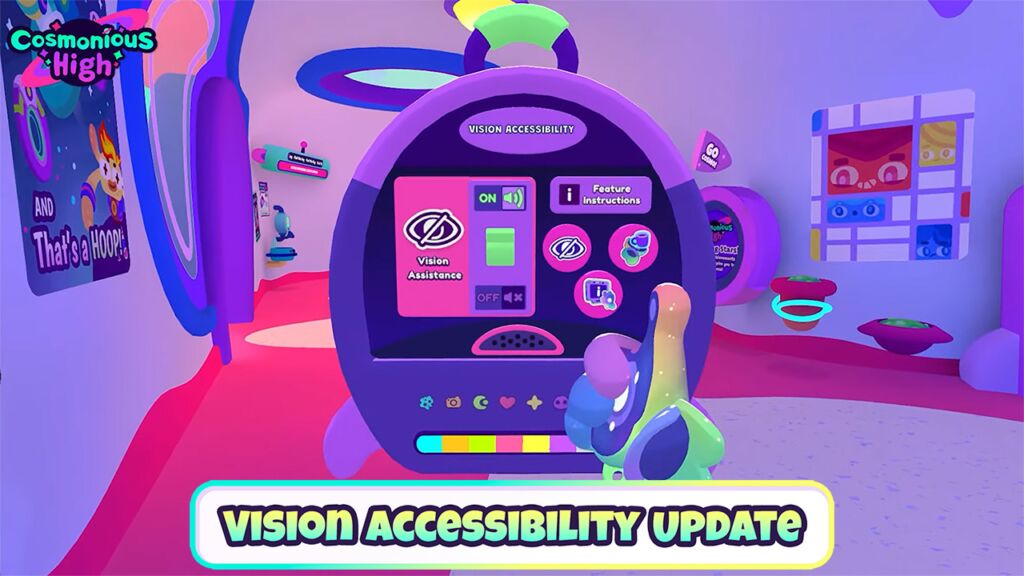
    Capture of inside Cosmonius High game showing more accessibility features that users can select.
    After Cosmonious High from Owlchemy Labs did some vision updates, they had over 1.53 million times users put their hand over an object to request text-to-speech–in one month and only with Quest users. Still think accessibility features are optional?
     

    Many platforms and experiences already contain volume controls for separate parts of the experience (e.g., voice chat, environment, or notifications all have separate volume controls). Learners should be trained on these controls at on-boarding.

    Capture from inside Cosmonious High game showing accessibility features


    Cosmonious High capture of some accessibility settings. Note that only one hand is needed to play this VR game.

    Generally, for information that is necessary for the learning event:

    • If the information is in speech, provide text equivalents (e.g., transcript).

    • If the information is in sound (environmental sounds or notifications), it should have equivalent visual and/or text indicators.

    • If the information is in text only, provide sound equivalents.

    2.3 Interaction & Movement

    Interactions in XR could be reaching, grabbing, and moving. Good experimental research exists from organizations like IEEE VR or ACM IUI on 3D user interface recommendations. Alger’s (2015) design advice showed a seated avatar seated work will be more comfortable than standing in XR.

    See Mike Alger's 2015 thesis for more but these images show where a user can be reasonably be asked to reach or gesture.

     Credit: Alger, 2015

    Almost every new XR user has walked their avatar into a wall. It happens. 


    Capture of my friend Peter when he walked his avatar into a corner.


    You stay in that corner until you can act like a good avatar, Peter!


    Given that the wall isn’t real, mistakes like this are forgiven quickly. IDs can ask learners to move. 

    (And Peter knew I took his picture at this moment above.)

    Movement in XR is an advantage of the metaverse. While research does not indicate that movement causes learning, it can greatly assist in the storytelling aspect of bringing a learner through an experience by requesting that the avatar move through the story in virtual space time.

    Movement is relative in this media. Frame of reference can be manipulated. The avatar can move, or the avatar can stay in one place and the scenes can move or change around them. There are a LOT of choices for movement in XR. From gaming research, it looks like most of the possibilities are aiming to reduce vestibular mismatch.

    In this area, movement-based engagement can be an area of exploration in designs. For example, asking learners to move to one side of the room or another is an interesting way to run a poll. XR movement often includes dancing and flying. Future research should explore the use of controllers or hand detection for learning.

    2.4 Emojis

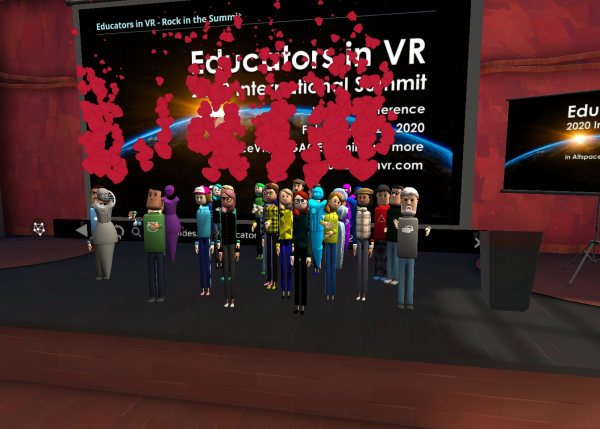
    Many social XR platforms have incorporated emojis and they can be used for their apparent reasons: love, happy, sad, clapping, or raised hand. Within designs, learners can use them differently, that is for feedback, poll indicators, or silent ‘I need help’ indicators. Learners have been known to redefine emojis to mean whatever makes sense to them during a learning event.

    Capture of a great moment from the start of the International Summit of Educators in VR. Each avatar chose to express a heart/love emoji.


    Cheers to Educators in VR for their use of emojis during their International Summit in 2020.
     

    Part 7 will cover designing and building XR experiences for learning. See you there!

    (more…)

  • I taught one of Earth’s first courses with the Oculus Quest 2.

    I taught one of Earth’s first courses with the Oculus Quest 2.


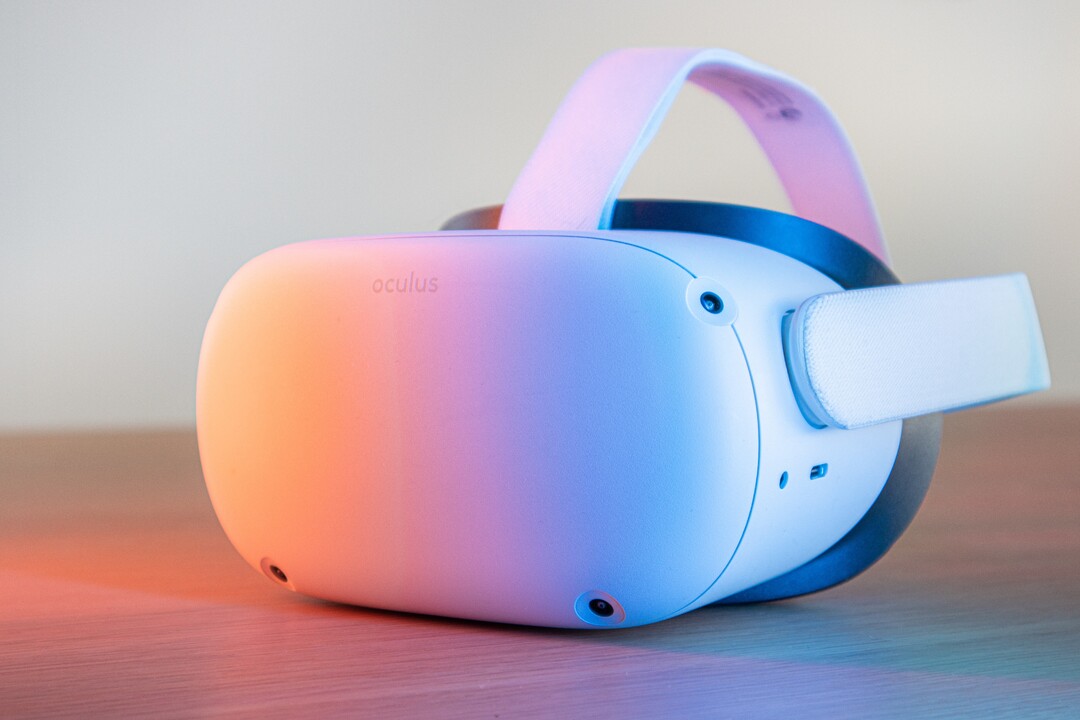
    Oculus Quest 2 VR headset, Photo by Remy Gieling on Unsplash


    Here’s how that went.


    First, I can’t provide a reference that this course, Introduction to Virtual Reality out of the Unity College XR Innovation Lab, was the first, but given:

    1. The timing: The Oculus Quest 2 was introduced on September 16 and shipped out on October 13, 2020.
      The Oculus Quest 2 is an upgrade of the original Oculus Quest. I used
      the original Quest during course development and had access to a Quest 2
      during the actual course run. As course development progressed, I did
      not know definitively that the Quest 2 would be the selected headset
      until late in the process. 
    2. The opportunity:
      College semesters tend to most often be trimesters (3 per year). The
      Quest 2 launched mid-autumn semester. The first opportunity to start a
      course, then, would be winter/spring semester starting January 2021. My
      5-week course squeaked in there between February 22 and March 28, 2021. Therefore, it is fair to say this course was one of the first because there really wasn’t much opportunity for other courses to launch and run before this one. 

    I
    do not write about the learners in any identifiable way. I write this
    article from the perspective of the designer and instructor and I write
    it for other potential virtual reality (VR) headset-using instructors.

    I’m going to call the VR experiences (games) apps since that term is current and understandable. 

    First,
    I will explain the course design and decisions. Next, I will name the
    apps used. Finally, I’ll explain the use of a device management (DM)
    system.

    Course Design

    In
    the design and development of this course, I played the role of the
    Subject Matter Expert (SME) and instructor introducing first and second
    year college learners to virtual reality. Interestingly, I am an
    Instructional Designer by degree and interest, so this was a bit meta
    for me; designing a course on design. However, I was assigned a Senior
    Instructional Designer and they had a process, timeline, and confidence
    in Canvas. We got along fabulously and we finished ~80 hours of development on time. 

    We did a backwards by design
    approach (don’t know what that is? Visit my honored friend Dr. Luke
    Hobson’s Instruction Design Institute course) to building these pieces:

    1. Designed the final project.
    2. Cut the project into chunks with an assignment due each week.
    3. Wrote the weekly lessons.
    4. Finalized the assignments and discussion prompts.
    5. Completed learning resources (intro videos, handouts, examples).

    I
    also worked with the person responsible for advocating for this new
    course to the college. They oversaw the place of this course within the
    college’s mission and programs. We worked on selecting the apps that
    would be preloaded on the headsets. Also, they played the role of
    teacher assistant in the course for tech support questions and they ran
    the entire DM process.

    We started gathering ideas of which apps we
    would include. Since we didn’t know which headset (or even if we would
    have a headset requirement) we started with the ‘free’, ‘easy-to-access’
    VR apps first. I came in with a good background in 2D VR choices and
    they had a few ideas from 3D VR choices. Both of us made sure to include
    a wide range of apps as we wanted the course to appeal to many
    different college majors. We scoped out apps ranging in feel (not too
    many first person shooters) and content (apps that were related to fun
    or work).

    Why teach VR design?

    Why is there value in teaching design?

    It’s
    the first step in an efficient and focused effort at getting to a goal.
    It is rare that organizations and individuals spend time on design (aka mission or purpose). People want to rush past it with the hand wave approach and say “yes, yes, I already know I want to include VR, let’s get down to exactly this VR! Let’s start!” 

    The
    point of a good design foundation is that it is like the rudder on a
    ship or the hypothesis to a scientific experiment; it guides you.

    A
    good design will provide guidance later when decisions arise. If you
    are clear on your purpose, then making later decisions becomes easier
    because you just evaluate which choice leads you along the path towards
    your mission or purpose. 

    For example, I worked on a VR project
    that had accessibility and “hold up to 1,000 simultaneous avatars” as
    its top design specifications. Those elements were key. So as I
    evaluated VR choices, we found VR choices that were:

    • Gamified
    • Popular
    • Supported by great tech 
    • Creative
    • Cheap
    • Gender-neutral

    But
    notice…none of these choices were the design elements we valued in the
    project. So these would have been the wrong choices; possibly fun
    choices, but wrong and regrettable. By staying focused on our mission,
    we maximized the chance of meeting our user experience expectations. 

    So teaching design for the purpose of valuing design ends up creating better products with more user satisfaction and better prices. Win-win.

    But what to teach in design?

    One of the first problems to pop up for me was content overload. These are some initial topics considered:

    • Objective/Purpose — what does the experience claim to do/what does it really do
    • Accessibility — tech/platform, modification ability, sounds, text, screen
    • User Control/Avatar Creation — privacy/controls/independence
    • Presence/Immersion — feeling of being there? Feeling of being inside the avatar?
    • Deep Play/Flow — does the experience fully engage the user?
    • Narrative — Does the experience appear to bring the user along?
    • Tech factors — platform/latency/updates
    • Navigation/Menus — 1st 30 seconds, how to exit, how to move
    • Manipulation/Change — how does the user impact the experience
    • Motivation/Gamification — why would a user use this past 30 seconds?
    • Social sharing — how do users use this together?

    Each one of those topics could be a whole course.

    The
    next problem that we were running into was selecting which apps to
    incorporate and keep the costs down. We aimed for less than $50 of apps
    per learner.

    We also had to keep one eye on accessibility. Because
    the learners were going to get a headset shipped to them, the college
    sent early strong advice that the learners were opting in to this experience, it was not being done to them.
    We constantly kept in mind the concern that a learner might have a bad
    case of vertigo and be unable to don the headset after Week 1.

    The
    solution of what to cover in the course versus what apps to pick (and
    how to plan for emergencies)was my favorite part of the course design. 

    You can view the design in the Course design: Introduction to virtual reality, Spring 2021 diagram below. Time progresses from the bottom up each week.

    Diagram showing five layers to the course design explained in the text. Shows that each week, a series of design thinking steps took place. The apps used in the course could be moved in and out with no harm to the overall course.
    Copyright Heather Dodds 2021. All rights retained.

    You should spy:

    Bottom Row: The Design Thinking Model :
    Empathize, Design, Ideate, Prototype, and Evaluation— the week by week
    design of the course followed these steps (5 steps in 5 weeks)

    Second Row: The Pixar Narrative Plot model (simplified): Introduction, Set the Scene, Dilemma, Crisis, Change, and Resolution 

    Third Row: The Course Final Project cut into chunks

    Fourth Row: The Four VR Design Elements that we decided to focus on — Function, Narrative Plot, Immersion, and Interface.

    Fifth Row: The Apps selected to align with a Design Element.

    As such, students worked through a design plan while learning about design planning. The apps worked independently of the course, then. It is easier to think of it in two main layers:

    1. The
      project — all parts of the assignments lead up to the completion of a
      3–minute video mock of the planned VR experience (Make an “ad”, Persona
      and Plot, Ideate, Storyboard, Video).
    2. The apps — all of the experiences were tested for appropriateness towards a specific design element.

    The
    in-between layers are all commonly recognized design elements. They
    become the grease that slips the main layers past each other. 

    Does one app fail or go offline? 

    No worries, slip in another one that addresses the same design element.

    Does a learner not finish their Week 2 assignment on time?

    No worries, the course is modular, they can proceed to the Week 3 apps while they catch up on the project.

    Aren’t these apps just for fun?

    No,
    I picked specific apps for specific design elements and prompted the
    learners to evaluate that element and discuss it within the course. Just
    saying an app was “fun” was asking to fail the course discussion.

    By
    using these layers, any problems with app cost, procurement, running of
    the app, or learner problems would not stop the entire success of the
    course.

    To explain the diagram, I’ll give one example from Week 1.

    We
    set up the course as a design cycle. Learners were going to make
    portfolios describing a future VR experience. The first step they needed
    to take was to empathize with their future VR app users. 

    Before they defined their users, they had to first be a user

    So, after safely unboxing and setting up their Oculus Quest 2, it was time for headset on and into some VR!

    They
    were asked to do three of these apps (below), talking out loud to
    themselves throughout the experience and then reporting back in a
    discussion prompt. Every observation is valid. They were tasked with
    evaluating function; how well did the app actually utilize the virtual
    reality medium? Could the experience have been done any other way
    equally as well? What stood out as amazing? (There were many more
    prompts to help them understand how to evaluate the VR design element of
    function.)

    One
    of the items that learners could have noted is that it is not easy to
    go to Antarctica. It is expensive and dangerous. Once there, learners
    may never have kayaked or used an expensive camera. It is unlikely
    they’ve ice-climbed. All of these are affordances that
    virtual reality gives that no other current experience can replicate.
    The closest is a 360 degree video, but those often come with little
    interaction, you can’t actually paddle your kayak, or pick up a camera
    and take photos. Therefore, the function of this VR app is high; it is
    appropriately using VR to offer an experience.


    Capture from inside of National Geographic Antarctica VR Experience, with the user in a kayak looking at whales in the water.
    Taken inside of National Geographic Antarctica VR Experience.

    After
    this, students had to create an advertisement of their own planned VR
    experience. So they had to already have some of the feelings of their
    users to get ready to market their idea to other users.

    Additionally,
    week by week, learners would get exposed to increasingly more
    sophisticated evaluations so that they would be able to begin to
    discriminate between what was good and what was bad about any VR
    experience. The point was not to finish the course with learners that
    love VR. The point was to make learners who can pick and choose and know
    how to find VR that works for themselves and their ideas.

    Which apps?

    We selected and planned for ~4–5 VR apps per week. 

    Week 1 — Function

    Week 2 — Narrative Plot

    Week 3 — Immersion

    Week 4 — Interface

    I want to strongly emphasize that we chose and included these apps for the design element per week.
    So as fun as Beat Saber can be, learners must report on the design
    elements of the interface (The menus, buttons, and music- what worked,
    what did not?) and the feeling of immersion (Were they really on a
    platform? Could they fall off? Was it light or dark? Do they have hands?
    Do they have a stomach?

    In
    hindsight, I’d add more apps all through the five weeks because the
    learners really loved this part of the course. In week one, they were
    delighted. But by week five, they’d lost their zest and were just
    looking to finish up. The device management process allows you to add
    more apps to the headset or switch them out, remember that. Just because
    a learner has an app in week one does not mean that you need to
    maintain access.

    Device management and privacy

    The key problem that many instructors worry about is the fact that the Quest 2s, when released, required the use of a Facebook account.
    I see this policy is changing and for the better. However, since we
    were at the front of using the Quest 2s right after they were launched,
    what were we going to do? Many instructors felt that learners using
    their own Facebook accounts for classroom activities was a violation of
    privacy in general. Personally, I will point out two thoughts:

    1.
    Many researchers and educators rightly point out that use of VR headsets
    for children under the age of 13 is pretty much not allowed by any
    Terms of Service of any of the major VR providers. Providing adequate
    protection in VR is something that these companies cannot assure.
    Therefore, bringing in school-age children into VR is something that
    requires more research and safeguards. 

    2. As someone who has been
    sexually harassed and bullied in real life situations, social media,
    and virtual reality, personally identifiable VR accounts is a good
    thing. Social media has played too fast and loose with privacy settings
    and many perpetrators know that. I don’t mind thinking that I’m playing
    against a specific real person on Beat Saber and vice versa. However,
    I’m an adult capable of taking responsibility for my own decisions and I
    also realize that as an adult, I am a consumer of my educational
    choices. I can simply put the headset down and walk away. Personally,
    I’ve only ever designed VR for adults. This policy was a protection
    maneuver for the long game and I support it.

    I know educators
    hated this requirement and rose up on arms about it. But it was not a
    battle that they were going to win immediately. They need to keep
    pushing for educational use in other ways within these platforms.

    The Unity College XR Innovation Lab
    used a device management service and the learners rented their Quest
    2s. The DM created the accounts and we monitored what was going on with
    the headsets through the course (what apps were on the headset and last
    used, battery charge, last time activated, etc.) In short, it worked for
    this time period. In the future, it’s probably better advice for an
    institution to buy their own headsets.

    Teaching narrative plot in design

    Final
    thoughts about teaching narrative plot (introduction, set the scene,
    dilemma, crisis, change, resolution) so centrally to VR design — do I
    regret that decision? 

    No, but I’ve thought about it a lot. Given
    the huge range of experiences possible in VR, was I correct in
    emphasizing that my learners should be able to deduce out and design in a narrative plot
    in VR? I could have taught the course more technically (resolution,
    degrees of freedom, refresh rates) or from other perspectives like app
    popularity or headset features. I’ve really kicked this idea around with
    my VR research colleagues and we’ve found that any VR experience ‘worth
    its salt’ will have these narrative plot features. Humans are pre-wired
    to understand and love stories. We seem destined to always look for
    cause and effect. We want to know why. Why does something happen? What
    caused it? What happens if I touch this?

    In VR headsets, the
    learner/user is the ultimate cause of effects. From the first moment (I
    taught that the Introduction is basically the Oculus Store ad…it is the
    moment when the learner previews what they are about to experience), the
    learner is beginning to move through the story.

    Just donning a headset means that the learner is willing to be changed by the experience at hand.

    When the headset powers up from dark to light, set the scene has begun.

    Even
    if the change and resolution happens far AFTER the headset comes off
    (this is very true of workplace VR training or meditation apps), a
    change does happen to the learner. So the elements of narrative plot are
    there. 

    After all, if virtual reality does not change you, why did you engage in it?

    Now…consider yourself introduced to teaching virtual reality.


    Got
    questions? Ask me! I have many more details like “what did we plan if
    students could NOT use the Quest 2?” or “how did you teach narrative
    plot in VR since VR is so new?”

    Please visit the Unity College XR Innovation Lab for more information and first-of-their-kind courses.

    Best wishes on your own course!

    #OculusQuest
    #VR #EdTech #TeachingInVR #CourseDesign #InstructionalDesign #Apps
    #VRApps #VRGames #VRCurriculum #DeviceManagement #Privacy #Design
    #Course #Experience #Learners #NarrativePlot #Elements #Reality #College
    #Development #Process #Function #Immersion #Interface #Menus #Buttons
    #VRSound #CreatingVR #DesigningVR #Layer #Storyboard #Persona #Pixar
    #Storytelling #Accessibility

    Updated images, mostly deleted stock photos, on February 18, 2026